Enhancing Web Design with Kaytha: A Handwritten Font
As a web designer, I recently embarked on a project to revamp the online presence of a boutique clothing store. The goal was to create a more engaging and visually appealing website that would resonate with the brand's target audience. One of the key elements in achieving this was selecting the right font. After some exploration, I stumbled upon Kaytha, a sweet and cursive handwritten font that promised to add a joyful and romantic touch to our design.
Introducing Kaytha: A Versatile Handwritten Font
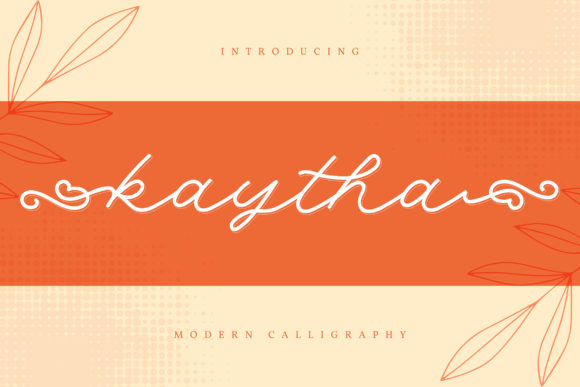
Kaytha is a premium script font that exudes a gentle and elegant vibe. Its cursive style is not overly ornate, making it perfect for adding a personal and inviting feel to any digital layout. The font's flowing lines and well-balanced characters make it an excellent choice for creating a warm and welcoming atmosphere, which is exactly what we needed for the boutique's online store.
Testing Kaytha in the Hero Section
The first area I tested Kaytha was in the hero section of the homepage. This is often the first thing visitors see, so it's crucial to make a strong and memorable impression. I used Kaytha for the main headline, "Welcome to Our Boutique," and immediately noticed how it transformed the space. The handwritten style added a touch of personality and charm, making the site feel more approachable and less corporate.
Readability and Visual Hierarchy
One of the primary concerns when using a decorative font like Kaytha is readability. To ensure that the text remained legible, especially on smaller screens, I experimented with different sizes and line heights. I found that using Kaytha for short, impactful headlines worked best. For longer text, I paired it with a clean sans serif font, such as Arial or Helvetica, to maintain a good balance between style and readability.
Using Kaytha in Call-to-Action Areas
Next, I incorporated Kaytha into the call-to-action (CTA) buttons. The font's playful yet refined appearance made the CTAs stand out, encouraging users to click and explore further. I used Kaytha for the button text, "Shop Now" and "Learn More," and complemented it with a simple, bold sans serif for the supporting text. This combination enhanced the visual hierarchy and made the CTAs more compelling.
Kaytha in Online Shop Banners and Blog Graphics
To further integrate Kaytha into the brand's identity, I used it in various other elements, such as online shop banners and blog graphics. For the shop banners, I designed a series of promotional images featuring Kaytha for the main message, like "New Arrivals" and "Sale." The font's elegance and warmth made these banners more eye-catching and aligned with the brand's aesthetic.
In the blog section, I used Kaytha for the post titles and category labels. The handwritten style added a personal touch, making the content feel more relatable and engaging. I also created a set of social media graphics using Kaytha, which helped to maintain a consistent brand presence across all platforms.
Font Pairing and Readability Tips
When using Kaytha, it's essential to pair it with complementary fonts to ensure a cohesive and professional look. For body text, I recommend using a clean and simple sans serif font, such as Roboto or Lato. This combination allows the handwritten style of Kaytha to shine while maintaining readability and a clear visual hierarchy.
- Hero Titles and Headings: Use Kaytha for short, impactful headlines and headings.
- Body Text and Supporting Typography: Pair Kaytha with a clean sans serif font for longer text and supporting copy.
- Call-to-Action Buttons: Incorporate Kaytha for CTA text, but use a bold sans serif for clarity and emphasis.
- Image Overlays and Banners: Use Kaytha for overlay text and promotional messages, ensuring there is enough contrast against the background.
Checking Webfont Availability and Licensing
Before using Kaytha in any web project, it's important to check its webfont availability and licensing. Ensure that the font supports the necessary file formats, such as WOFF and WOFF2, for optimal performance and compatibility. Additionally, verify that the font includes the required styles, weights, and multilingual support if needed. Finally, confirm that the commercial license allows for use in websites, client projects, and other digital assets.
Conclusion
Kaytha has proven to be a valuable addition to our web design toolkit. Its sweet and cursive style adds a unique and personal touch to the boutique's online store, enhancing the overall user experience and brand identity. By carefully considering its use in different sections and pairing it with complementary fonts, we were able to create a visually appealing and highly readable website. Whether you're designing a creative portfolio, a coaching website, or a product landing page, Kaytha is a versatile and charming choice that can elevate your digital projects.